8.14.2011

Cutting the Cord, Part V: Attic Fail

Yesterday we once again tested our antenna reception. This time we used various combinations of bring on the roof, in the attic, with a close-to-the-antenna tuner (FYI: I hadn't read the specs on this device and was extremely surprised at its diminutive size!), with and without pre-amplification, and we have some interested, but slightly frustrating results.

The major frustration is that attic-mounting the antenna is simply a no-go. I'd read that antennas lose 40-50% of their gain when they're moved from the roof to the attic and that our aluminum siding was going to be a major attenuator, but I also know that in my childhood, my parents' attic-mounted antenna in an aluminum-sided house was able to pick up stations from London, Ontario, 88 miles away (CKCO-13 currently broadcasts from a height of 291 meters, at 325 kW.). So, I remained optimistic about our chances picking up the Philadelphia stations.

Gratuitous Table of Philadelphia Broadcast Stations:

Station
Network
Height (meters)
kW
Distance (miles)
KYW-TV
CBS
375
790
47.1
WTXF
FOX
282.3
1000*
46.9
WCAU
NBC
400.1
325
47
WNJS
PBS
264
197
28.1
WPVI
ABC
332
30
47.2
*According to Wikipedia; however, our experience leads me to believe AntennaPoint.com and otherantenna-finding websites, which list roughly 270 kW.

Gratuitous map placed here mostly for Chris.
Side note: there are a lot of websites that can help with the over-the-air process. The three I've used the most are AntennaWeb.com, AntennaPoint.com and more recently, TVFool.com. TV Fool, especially, easily creates some great maps that can help you determine the size and placement of your antenna. For example, in the extremely colorful map, we are located at the red pin, and WTXF, FOX-29 of Philadelphia is located at the green dot at the center of the rainbow bullseye. This station is of particular interest to us, as they will be broadcasting nine of the sixteen Eagles regular season games. For those keeping score at home, the second-most-important station we want to receive over-the-air is KYW, the Philadelphia CBS affiliate (two Eagles games, but also primetime programming which won't be available through Hulu).

According to TVFool, interpret the map as follows:
  • White is extremely strong.  Beware of signal overload on amps.
  • Red-yellow-green are all quite strong. You can expect reasonable coverage with an indoor antenna.
  • Cyan is where it's advisable to move the antenna up to the second floor or attic.
  • Blue is where it's probably necessary to install a good antenna on the roof.
  • Purple is quite weak and you really have to work at it for any chance of reception.
Anyway, enough hypotheticals ... it's time for some actual results.We started out using the antenna in the attic, aimed at what we thought was due north (more on that in a bit), with the tuner. We received a measly 5 channels when we scanned, and all but a few wouldn't even really tune in when we tried to view them. Despite Chris's comment (as Kristin) on my last Cutting the Cord post, we decided to try the pre-amp along with it. After all, we had the thing, why not give it a go, right? It turns out it helps a bit, but not nearly as much as with the addition of the tuner. We received 7 stations.
    *sigh*

    Back out to the roof. We had to disassemble the antenna to get it out of there, and then reassemble it for roof mounting. And we were in a hurry as there was a storm coming (Had I been on my computer yesterday, I'd have captured a shot of the radar map, but I didn't. And, for what it's worth, it's apparently difficult to find yesterday's weather maps online.). FYI, sticking a broom handle on the back on an antenna provides you with a nice pole with which to aim and transport your antenna array. And, it also provides a great temporary mount -- just drop the pole into the tile insert at the top of your gas-water-heater chimney vent.

    We aimed the antenna due north (we thought) and attached the tuner: 25 (!!!) channels, but still no FOX-29.
    We double-checked Google Maps and adjusted our aim: 36 channels (including FOX!)
    We added in the pre-amp: 41 channels

    WOO!

    However, out of six possible bars, the Fox station wavered between three (when it came through clearly) and two (when it began to pixelate occasionally or get choppy). This isn't ideal. Joe is concerned about the quality of future feeds, while I remain optimistic that the weather wasn't ideal between here and Philly and that we should consider this a good result. We were both surprised at the difference that aiming makes even over such a distance, even with a "multidirectional" antenna.

    We're also both hoping that some of the hiccuping and choppiness is due not to the actual quality of the antenna reception, but rather to the antiquity of the computer displaying the feed. (2.0 GHz and minimal RAM ain't what it used to be.) Due to a well-timed Woot this week, I've ordered a new computer for myself, and my computer (3.0GHz and plentiful RAM) will become the new DVR. That's the final piece of this puzzle. At that point, we'll test everything one more time, before working on permanently mounting an antenna to our roof (pointing the right direction this time). Then we'll unwrap and program our nifty remote control and our new over-the-air to DVR, combined with Hulu and Netflix on the Xbox system will be fully functional.

    --End--

    8.10.2011

    Couponing

    Some of you know I was recently (a few months ago) an audience member on the Rachel Ray show. During the show we saw, Rachael hosted two women from the Extreme Couponing show. I was quite amazed and decided to try serious couponing myself.

    After a steep, but relatively painless, learning curve, I began regularly saving roughly 60% of shelf prices on my groceries. There are lots of websites and blogs to teach you how to do this. I use Couponing 101 and Living Rich with Coupons the most. I employ what Couponing101 calls "Realistic Couponing." I do not regularly save 90% on my groceries (though I did yesterday for one transaction), nor do I hoard 48,000 rolls of toilet paper in closets and under my children's beds (though I did add some shelving in my basement to better store cleaning products, and I reorganized my bathroom closet to better store deodorant, shampoo, etc). Nor did I spend lots and lots of money in order to accommodate my couponing (though I did buy a big honking binder, some clear sleeves for coupons and an on-sale laser printer ... but we'd already been pricing the printer, anyway).

    Here's my basic process.

    Throughout the week, I check daily on the two above-mentioned blogs and print out any coupons of interest. I leave these printouts to gather in my printer's out tray all week. On Thursday - Saturday when the blogs begin posting the coupon to deal matchups for the stores I use (Walgreen's, CVS, ShopRite, and verrrrry occasionally Target and Staples), I begin copying and pasting from the blog lists to my weekly Word doc shopping list.

    But Sunday is my big day. On Sunday I buy 2-3 newspapers to get multiple copies of the various coupon inserts (SmartSource, Red Plum and the monthly Proctor and Gamble). My mom also snail mails me her Red Plum inserts a couple of times a month, since Red Plum is strangely hard to find around here. Then I begin clipping. I cut out all the printed coupons and all the ones I want from the various inserts. I sort them alphabetically by brand name: Avanti, Betty Crocker, Campbell's, Duncan Hines, through to Welch's, Yoplait, ZipLoc, and file them in the binder. I pull out all the coupons I want to use, based on the shopping list I've already created, and file them in envelopes marked with the store's name. I cross out any coupons I personally don't have off of the list, so I don't buy something that's not a deal, if I can help it. Then I pull all the remaining coupons that are due to expire before the following week and pick out a few that may not have corresponding specials, but that I'd still like to take advantage of. These go in their own envelope. Finally I edit the shopping list and reprint it.

    This preps me for shopping day. I have my envelopes for ShopRite, Walgreen's, CVS, and "Expiring." I have my shopping list on a clipboard. I have my binder with me in case there's a manager's special or something in the clearance section I want to add a coupon to. Armed with this arsenal of savings, I usually shop on Mondays or Tuesdays. I use my reusable shopping bags, and I'm not afraid to run things through in multiple transactions to get the best deal.

    Here's what I did yesterday.

    Walgreen's
    Expo 4-pack dry erase markers: sale price $1.99
    Scotch envelopes (big manilla ones for mailing resumes): regular price $2.29
    5 Wexford mini composition noteboooks: sale price 5/$2.50
    Walgreen's in-ad coupon: $1.45 off the notebooks
    Expo printable coupon: $2 off the markers
    Walgreen's register rewards from last week: $3 off the transaction
    Total value: $12.41
    Total Out-of-pocket (after tax): 46¢
    97% savings

    CVS
    Colgate toothpaste: sale price $1.67
    Colgate toothpaste: $3.69
    3 Simply Asia noodle bowls: sale price $1.50 ea.
    Gardetto's snack mix: sale price $1.50
    Kellogg's ceral: sale price $2.50
    3 Chex cereal: sale price $2.50 ea.
    2 Nature Valley granola bars: sale price $2.50 ea.
    3 Milk-Bone dog biscuits: sale price $3.00 ea.
    2 Hershey Air candy bar: $1.19, BOGOfree
    Lysol hands-free soap dispenser kit: $12.99
    Coupons for the above products, including a $5 Extra Care Bucks reward from a prior week: $20.84
    Total value: $73.37
    Total out-of-pocket (after tax): $28.30, plus I received a $5 ECB certificate and a $10 Exxon gas card (An advertised deal ... spend $30 (shelf price, before coupons) on an assortment of items ... hence the weird Gardetti's snack mix purchase and the non-sale Colgate purchase ... and get a $10 gas card)
     61% savings, not including the $15 toward gas and future CVS purchases

    I'm not going to list out everything on my ShopRite transaction. I purchased 55 items (including 24 containers of Yoplait) ranging from country-style ribs, watermelon, Degree deodorant, Breyers ice cream, Dove bars. My out-of-pocket cost was $65.61, and my savings from sales and coupons was $76.48, for a total value of $142.08. Plus, I received $10 in certificates toward future grocery purchases. 54% savings, plus the $10 toward future groceries.

    I haven't been hyper-vigilant about recording all my transactions, but I've remembered to record most of them in an Excel spreadsheet. According to this, I've saved over $2600 since April. I feel that's a great return on the time I've put in (maybe 15 minutes a day, plus (generously) an hour for making and refining the shopping list and 2-3 hours clipping and sorting -- which could be faster, but I do it while watching TV). About $31 per hour, which is more than I make at my other part-time jobs.

    I don't know that I'll be able to do as much of this when I eventually return to full-time work. I think I'll have it sufficiently streamlined by then to continue with it largely the same way I do it now. There are coupon storage methods that have far less front-end work. Some people just store the intact circulars and then just clip the coupons later that they intend to use. I'm reluctant to switch to this method because I invested money in the plastic insert sleeves and, frankly, I have the time to clip. Plus, it's easier right now for me to just clip and file everything and get it over with.

    Also, I send all my expired coupons to Support Our Troops. Overseas military folk can use coupons for up to 6 months past their printed expiration dates. Online self-printed coupons aren't accepted, so those I just recycle.

    Anyway, the major trick to couponing these days is to find a blogger who already matches up your local store's weekly deals with the database of currently available coupons. She (I've yet to come across a male couponing blogger, though I've online met a number of male couponers) does the legwork for you. Then just compile a good stockpile of coupons so that when something goes on sale, you can get additional coupon discounts off 4 of 5 of them. Frequently this results in free items, especially with stores that double coupons. Coupons can be found online all over the place, too. There are coupon sites like coupons.com, but also the manufacturers provide lots of coupons and promotions. Go to their actual websites, and also "Like" their Facebook pages, and you'll get a ton more coupons. Signing up for free samples also results in a lot of high-value coupons.

    That's the jist of it. Good luck saving money on stuff you already buy!

    --End--

    8.09.2011

    Cutting the Cord, Part IV: Two Steps Forward, One Step Back

    We set up and tested our antenna today. On the roof (with Joe holding it at the peak and pointing it roughly toward Philly ... it turns out we don't own a compass), we received all the stations we could expect to.

    However, we're hoping for an attic-mount situation. We have a lot of trees and don't fancy the fall leaf drop tangling around our antenna, or the antenna getting smacked regularly by falling twigs and branches. So, we moved the antenna to our bedroom (right below the attic but WAAAAY easier to get to) and scanned for channels again. Fewer and with significantly lower quality.

    We've decided to give the poor struggling antenna some help. We've just ordered a pre-amplifier and a tuner. Some additional amplification should help out a lot, as should tuning the signal close to the antenna, rather than running the signal through (literally) fifty feet of coax before it's tuned at the DVR-PC.

    Lots of high hopes and optimism tempered with some disappointment that it didn't work out just the way we wanted to as-is. Depending on shipping speeds, we should be ready to test things again this weekend.

    Total Cutting the Cord Expenses to Date: $62 for the new remote, and $30 for the USB tuner stick. $0 for trial memberships for Hulu-plus and Playon. The antenna cost $119.99. Add another $133.66 to the bill for the pre-amp and tuner. Total out-of-pocket expenses thus far:$345.65. Roughly 4 months without Comcast to recoup that.

    --End--

    8.08.2011

    Many Things to Do

    We have a lot of catching up to do today. The downside of taking a vacation.

    Speaking of which ... a wonderful time was had by all on our recent weekend in the Poconos. We were there Thursday through Sunday and were joined Friday through Sunday by our college friends, Adrienne (of martinimade.com) and Scott and their kids. We rambled around the lake, threw the kids in the lake and onto the playground, and played lots and lots of games. Thumbs up for Munchkin, Castle Panic and Forbidden Island, not so much for Castle Keep ... but maybe we were doing it wrong. The kids ran around, got on each other's nerves, or alternately became friends and got along great, were adorable and funny, played Xbox, and had a great time, too. We also ate a lot. But, that seems to be what happens at the Mountain House.

    So, today: the catching up. Coupon clipping and organizing, shopping lists, pre-trip laundry to put away, post-trip laundry to do, piano practicing, vacuuming, job searching and applying, Emily's trip photos to process (I'm only about 20% done...yeesh), exercising, Fiddler on the Roof-ing.

    In other words, a Monday.

    [UPDATE 9:55 a.m.] I've applied to nine actual job postings and cold emailed four other schools just to put my name in front of them. I've also printed a slew of coupons and refined this week's coupon shopping list. The kids have accomplished approximately bupkus. I think I'm finally ready to get up from the computer for awhile.

    --End--

    7.31.2011

    Cutting the Cord, Part III: Signal Acquired!

    We received our KWorld USB tuner stick, which comes with a little-bitty ATSC antenna. We happen to already have 50' of coax cable lying around (we seem to have only 18" patch cords and one unreasonably long 50' cable). So, when the tuner stick arrived, I immediately tried it out.

    First I installed the stick and accompanying software on my computer. Everything went smoothly, but the antenna was unable to detect any signals. This was not surprising. Our computer room (and TV-viewing family room) is located on the lowest level of our split-level house, and therefore is half underground. Antenna height was approximately 3-feet off the ground. Woefully inadequate to reach the broadcast towers 30-50 miles away. (According to AntennaPoint, we have 14 UHF transmitters within 60 miles of us, ranging from 130 to 770kW, covering CBS, 2 NBCs, 2 PBSes, FOX, Telemundo, Univision, Ion, MyTV, ETV, The CW Network, and "Independent." So, all the major networks except ABC ... which we can stream through Huku. Another 20 miles adds 5 more stations, but that seems unlikely, despite the antenna's claims.)

    As I saw how the install would work and that was really my main objective, I uninstalled it. When Joe got home we installed it again, but this time on the DVR-PC, which is where we plan to keep it. We ran the 50' of cable out the window and up a ladder, where Joe held it up on the highest point of the roof (approximately 28' above the ground). The auto-search channel scan picked up one signal from Wildwood (WMGM, NBC-40, 205kW) and one from Philadelphia (WCAU, NBC-10, 320kW). But the stick would only actually tune in the Wildwood station. The image was periodically steady and then very jerky, but I think that's a processor or RAM problem.

    Looks pretty impressive, no?
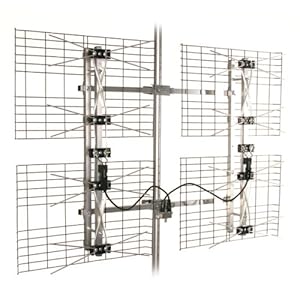
    Since achieved a signal with the rinky-dink antenna (I haven't been able to find information regarding its gain), we decided the over-the-air option has real possibilities. After browsing around and reading reviews, we ordered the Antennas Direct DB8 model from Best Buy. It was cheaper through Amazon, but we decided it's worth the extra bucks to have our local bricks and mortar Best Buy available to us for questions, servicing, and easy return, if need be. We're very optimistic about the stations we'll be able to receive with this bad boy. Reviewers in Maryland report receiving Philly stations quite clearly.

    We plan to mount the antenna in the attic, and should it receive the stations we expect it to, we may also opt to purchase the HD HomeRun tuner, and return the USB stick. This would act as a tuner up in the attic, closing the lengthy gap between the antenna and tuner. Then we'd run network cable from the tuner down to the computer. The device is compatible with the SageTV software we're already using for DVR purposes, so ... sweet. Sounds like a plan, but we'll see.

    Should we receive a CBS station clearly, this would eliminate one of the biggest gaps served by our Playon subscription. We'd still have a few holes in our current viewing habits to do without, or fill, but Playon wasn't going to help much with those options anyway (Food Network, Discovery channel, AMC, Nick).

    Stay tuned ... the big antenna is due to arrive any day now.

    --End--

    7.25.2011

    Interviewing for a Job

    First off, this is not one of those "How To" blog posts. This will not tell you how to write a resume, remind you to floss and use mouthwash prior to meeting a potential employer, or give you tips on how to best answer interview questions.

    Rather, this will be categorical. Should you once have interviewed me and you think you recognize yourself, you don't. All accounts are humorously fictionalized, and all names, dates and locations have been removed. I have also merged events together. This last item is not due to a desire to make interviews seem more action-packed or interesting, instead it is the result of a 40-year old brain trying to recall what has surely been at least eighty (this is not an exaggerated number) job interviews over the past eighteen years.

    1. Great, kid. Don't get cocky.
    These are the interview experiences you hope and pray for. Your driving directions are accurate and you arrive the requisitely early-but-not-too-early time prior to your scheduled interview. You walk in feeling great, immediately forge a personal connection with at least one of the interviewers as well as the receptionist in the lobby -- a shared love of quirky earrings or lavender-scented handcream, perhaps. You confidently and enthusiastically respond to each question, remaining on point and even manage to earn a chuckle or two. The interviewer even begins using the word "you"  and "will" rather than "would" when referring to the person who will eventually get the job. As in, "How will you manage student behavior in your classroom?" or "How will you handle multiple assignments in a timely fashion in our department?" You leave the meeting feeling triumphant, sweat-free and ready to take on the world. You begin mental salary and benefits negotiations and note the Starbucks and Walgreens locations along your eventual commute.

    Why you don't get this job: the employer actually has someone else in mind before placing the ad and just has to go through the motions or a job search and/or you are the right race, gender, age, etc to fit the location's demographic needs.

    2. I Have a Very Bad Feeling About This.
    This is the opposite situation, altogether. You feel unprepared, so much so that you very nearly call and cancel the appointment. Immediately before the interview, for which you are arriving exactly on time, or even a minute or two late (later than five minutes late is unthinkable), you realize one or more of the following: you have a substantial run in your nylons, you have broken the heel of your shoe, your nail polish is glaringly chipped, you have a stain on your necktie/shirt/lapel/pants (!!!), and that you have forgotten to write down the suite number you're looking for in the ginormous office complex in front of you. As you make your way toward the receptionist, you feel as though every part of your brain has suddenly forgotten everything it has ever known. Flopsweat doesn't even begin to describe it. Not only do you fail to adequately answer the interview questions, you forget your main points you'd meant to shoehorn in somewhere. When asked to tell the group about yourself, you ramble aimlessly through a list of reasons why you're no longer at your last four employers. No one smiles, makes eye contact or even looks up from their designated list of questions. Upon leaving, you thank Janice for meeting with you and she politely corrects you, "Rhonda."

    Why you don't get this job: Really?

    3. These aren't the droids you're looking for.
    This interview may start out like glowing example #1, but at some point shades of #2 kick in as you realize you are completely unqualified or otherwise inappropriate for the position in question. You continue to politely answer questions and rather than lie through your teeth, blatantly admit that you have no experience in the area in question. You brazen through with examples of quick-thinking, on-the-job learning and other shining moments of your brilliance and creativity. After all, a job is a job, and if you manage to whangle your way into this one, you can always look for something more appropriate, right? Sometimes you manage to forge a great connection with your interviewers, but more often you feel as though they are speaking Portuguese (this example assumes an utter lack of fluency in Portuguese). While continuing to forge ahead, part of your mental process is continually asking some form of, "Why am I here?!?" or even "Did they even read my resume?!?"

    Why you didn't get this job: Because you're 100% wrong for it and always were. Alternately, this is the job you are most likely to get. It will be awkward and uncomfortable and you will struggle madly to succeed. In the job offer phone call there will be some mention of how you will bring your unique viewpoint to the position. This is not true. They really want you to fit their existing mold as soon as possible.

    --End--

    ps. Today's interview? Very much #3. I remain unsettled.

    7.23.2011

    Cutting the Cord, Part II: Baby Steps

    So, based on our media history and habits (see yesterday's post), we've pretty much decided to try to go Comcast-free (saving us $88 per month).

    The questions that remain are:
    1. Which online providers can get us the shows we're accustomed to watching?
    2. How do we get these shows to our TV?
    3. Is there a solution for sports, particularly the NFL?
    So, I tackled these one at a time. I wrote down a list of all the shows we'd asked our Comcast DVR to record (30 of them, ranging from Mad Men to Restaurant: Impossible to Mythbusters), added in the  few shows the kids like to just flip through and watch (iCarly and Spongebob, primarily). Then I browsed lists on Netflix, Hulu, Hulu-Plus, and Playon.[1] I wanted to see where we'd get the best bang for our buck.

    Each has its own strengths and areas of specialization.

    Netflix is still mostly about DVDs. The shows they have available are generally released one season at a time when the season comes out on DVD. I expect this to change and for more streaming content to become available. They already have some shows that are available soon after network broadcast. Programming is provided commercial-free.

    Hulu provides full episodes of ABC, NBC, and Fox programming, plus a variety of other clips and videos. 5 or so episodes of these shows are generally available within 24 hours of initial network broadcast. Hulu-plus is a premium (paid) version that provides whole back seasons of the same shows, as well as some additional shows (some of which are Hulu-Plus-only shows). The programming has limited commercial interruption.

    Playon is a content provider that basically lets the end-user access and view video available on a variety of Internet sources, re-encoded for viewing on a TV. The Playon folks are not creating or storing any content, that I can tell. Rather, the software provides access to programming already accessible on the Web, bringing a bunch of portals (CBS, YouTube, ESPN, Pandora, to name a few) together in one interface. It requires a Windows PC and some sort of media device to bring the info from the PC to the TV. There are stand-alone devices for this purpose (for example, my brother bought a Western Digital Life Hub). We can do this through our Xbox 360[2].

    Our existing Netflix account could provide a decent amount of what we wanted, and Hulu (I like the backlog access of Hulu-Plus, myself, since we don't always get around to watching a show, but then catch up weeks at a time all at once.) provides most of everything else. CBS and the Food Network are prominent holes in this Venn Diagram of available content. So I signed up for an account, and examined Playon more closely. CBS content is readily available. Food Network content (like all content through Playon) is limited to whatever programming is available on the Food Network website. Some of our favorite shows don't exist there except as clips (Chopped comes to mind). Plus, Food Network isn't a regular part of Playon content. It's available as a plugin or add-on script, which means it may or may not work at any given time. Not ideal.

    Plus, now that we can try it out, we've discovered that Playon won't stream smoothly through our DVR-PC. The old machine just isn't powerful enough to handle it. In fact, my PC is only just barely able to meet Playon's minimum requirements. I don't really want to run Playon through my machine because it means leaving an additional PC powered up all day (in addition to the DVR), and it saps nearly all available resources from my PC. Should I become gainfully employed sometime soon, maybe a nice powerful quad-core is in my future, but until then any Playon streaming renders my system otherwise inoperable. The additional cost of a PC just to run Playon through seems silly.

    Which brings me to issue #3. What about sports? As football, is our chief concern here, I examined the Eagles 2011 season schedule, and all but two of their games are on regular over-the-air network stations. This raises the question of sticking a good old-fashioned physical antenna up on our roof. Granted, we are nearly 50 miles from the Philadelphia network broadcast towers, but those aren't rinky-dink small-town broadcasts, either. Philly is a big city with big city media[3]. So, we're going to test out our physical digital reception.

    After spending some time over on Antenna Web, I felt much more informed about our over-the-air options. I ordered a KWorld USB TV tuner stick and when it comes we're going to run it up the flagpole and see if anybody salutes. (not literally, as we don't have that kind of flagpole, but we will try in the attic, on the roof, etc) If it works at all for any programming, we'll go over to our local Best Buy and buy a medium directional antenna, and a pre-amplifier, as recommended for our address by Antenna Web. If the tuner stick doesn't work at all, I'm only out $30. And if the higher-powered antenna and pre-amplifier don't work, I'll simply return them to my local bricks and mortar store. But if we get a clean digital signal, we'll be set for the football games and for the CBS shows not provided on Hulu or in a timely fashion on Netflix, without having to spend additional money on Playon. The ESPN and NFLNetwork games (one game each this year) will just provided excuses for us to take the family to the nearest sports-themed restaurant or to go over to a friend's house for the game.

    Plus ... there's a back-up plan (for NFL content, at least). DirecTV now has multi-platform licensing for their NFL Season Pass[4]. A DirecTV subscription isn't necessary. For around $350 (sources vary), we can stream all of the NFL games for the whole season through our computer to our TV. There's only limited delay capabilities (reportedly 15 minutes of pause), but the feed would be complete and clear and unaffected by weather conditions. And $350 is still WAY less than the $97.90 per month for Comcast TV times the six months of football season ($587.40).

    SOOO purty!
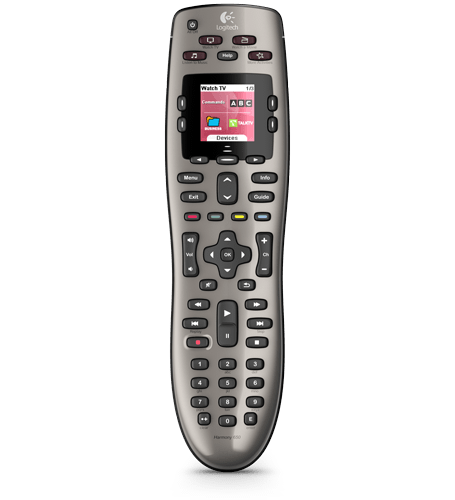
    To facilitate the big switchover, we've also ordered a Logitech Harmony 650 remote. This will allow us to control our TV, DVR-PC, Xbox 360 and eventual other add-ons. It cost $62.17 from an Amazon seller. When it arrives, I'll have a fun time setting it up and programming it, I'm sure. Since our Comcast remote will have to go back to the company when we eventually cancel the service, it seems a good time to consolidate our remaining Firefly DVR-PC remote and Xbox 360 controller-as-remote (for Netflix and Hulu-Plus) situation.

    So, at this point I'm really hoping the antenna option gets us at least the basic network feeds. Then the old DVR can still give us timeshifting capabilites and we can cancel our Playon membership before the trial period ends.

    As for the Food Network? I don't know. Maybe we'll just minimize our DVR software and watch the full episode streams from the website through our DVR computer. Maybe I'll have to pirate some episodes now and then. Maybe we'll do without cooking shows. (say it ain't so, Joe!)

    Cutting the Cord Expenses to Date: $62 for the new remote, and $30 for the USB tuner stick. $0 for trial memberships for Hulu-plus and Playon. Still paying for full Comcast TV and Internet. Total OOP: $92. Recoup time: 1.05 months without Comcast TV.

    When the antenna situation gets going, I'll update. Similarly with the nifty new remote.

    --End--


    1.We already subscribed to Netflix streaming + 1 DVD/month $8.99/month plan. Hulu is free. Hulu-Plus is $7.99/month. Playon is $4.99/month, $39.99/year or $79.99 for "lifetime."

    2.Well, why didn't you list that among our assets in the first place?

    3.I don't really know what I'm talking about or how these numbers compare to any others. But, logic dictates that Philly is a giant media market and will broadcast accordingly. KYW-DT (CBS) runs at 770 kw. WXTF-DT (FOX) is currently running at 305 kw. WCAU-DT (NBC) runs at 112 kw.

    4.NBC has multiplatform licensing for their NFL broadcasts, too. Apparently they're allowed to live-stream the games on their website. Three Eagles games this season are on NBC.

    7.22.2011

    Cutting the Cord, Part I: History

    Thanks in part to my brother's inspiration, Joe and I are finally attempting to cut the coaxial umbilical of cable television. Over the years, as we've watched our Comcast bill mount, we've researched various online media options. We've never liked feeling beholden to the media "man." Years before it became a popular* thing to do, we got a Tivo and hacked the remote to start skipping commercials. Then, in 2005, when Tivo seemed to be getting too Big Brothery, and rumors about embedded commercials and code preventing skipping became increasingly prevalent, before it, too, became a popular[1] thing to do, we built our own SageTV based DVR computer. Freedom!

    We had all the hard drive space we could ever want (75GB! Holy Cow!), tons of power (Pentium 4! 2.0 GHz! Wow!), dual Hauppauge tuners, and a nifty Firefly xml-programmable remote. We customized the Sage software with a number of add-ons and skins and so forth, and programmed the remote to suit our needs. (Yes, I learned some minor xml coding!) We plugged in our analog Comcast signal and were good to go. The system was streamlined and gorgeous and did everything we wanted it to. We later upgraded it with a 1TB external drive (for storage of ripped DVDs, home movies, downloaded programming)

    Then came the big 2009 Analog Signal Drop by Comcast. They decided to go all digital. "OK, no problem," we thought, "We'll simply get a new digital tuner card for the DVR and go happily on out merry way." No dice. The digital tuner card required a PCI-E slot, which would require us to get a new motherboard, and effectively, build a whole new computer. As I'd just lost my full-time teaching position, this was a no-go.

    So, we buckled back under to The Man. We subscribed to Comcast's digital cable/DVR service. The Sage-PC was kept as an additional input on the TV, so we could continue to access the TB drive. It was not an ideal solution, but it worked for awhile.

    Eventually, our introductory rate ended and the prices went up to their normal level. We struggled through several months before a friend mentioned that he'd called Comcast and complained and been put on a discount/introductory plan. I did the same and got us 6 months of cheaper rates. Whew! This deal expired last April, on my birthday, oddly enough.

    In the meantime, we'd expanded our media capabilities by purchasing an Xbox 360 (winter of 09-10). This gave us access to Netflix programming on our TV. We subscribed to Netflix about a year ago, but just dropped the 1-DVD a month portion when the company raised their rates. We've kept the $7.99/month streaming service. This comes right through the Xbox and is quite slick and painless. Around this same time, we ditched our brand-new-in-2002 Samsung DVD-VCR combo, as the kids had long since finally outgrown our few remaining children's videos. The 360 works great as a DVD player for us.

    So, we have three inputs into our TV (a 36" Sony Wega CRT-monitor[2] for those keeping score at home)

    Since then, the TV portion of our Comcast bill[3] has been roughly $98 per month. If we drop the TV, and keep only the Internet service, the Internet service will go up a little bit. But, by dropping the television, we can save $1055 per year.

    That's a pretty big incentive to DO SOMETHING.

    So, we evaluated our options:
    1. Illegally download all programming we'd ordinarily been recording (29 network and cable shows). We decided against this option due to the illegality of it, and the time-consuming task of finding and downloading 23+ hours of programming every week).
    2. Continue to pay Comcast. Wrong answer.
    3. Drop Comcast and begin watching Internet programming exclusively. Hulu, Netflix and Playon proved excellent content coverage and availability. Seems like a no-brainer.

      BUT....

      And this is a relatively big BUT. What about sports?

      We aren't rabid sports watchers here, but the various pro sports are something we want to continue to have access to. Joe records and watches a dozen or so Phillies games each season, plus a handful each of the Flyers and the Sixers (teams OWNED by Comcast). But the major sticking point has always been the Eagles. Joe is a big Eagles fan, and over the years of our marriage, we have built a tradition/culture around watching the games on a time-shifted delay.[4] I make nachos, ribs, wings, etc. We invite people over. The kids are really starting to get into recognizing the players and understanding the flow of the game. How can we watch football without cable?

      We've finally come across two possible solutions. One is less expensive, albeit iffy, and the other is a sure thing, but lacks time-shifting capabilities and is expensive. We're going to try #1 first. But, that brings us up to the present. As this post is about the history of this endeavor, I'll continue more tomorrow.

      --End--


      1. except among serious techie-media nerds
      2. We also use Comcast for our cable-broadband. We like this service and its speed, and plan to continue using it. At least until affordable 4G personal hotspots become affordable. Or FIOS comes to town.
      3. Yes, I know. Flat panel. LCD, etc. Well, when we bought this beast (shipping weight 270 lbs), there was still lots of debate over LCD vs. Plasma, and neither option was terribly affordable. But, seriously, this TV is a beast. We love the picture quality and so forth, but the thing has required jacks to prop up the center of the solid-oak entertainment center my dad (who builds things super solidly) built.
      4. We shift starting our viewing by an hour or two, granting us the freedom to replay plays as often as we'd like, and the ability to skip commercials, talking heads and quarter and half-time breaks.

      7.21.2011

      Back on the Wagon

      This is me ... only, you know, female.
      Or is it "off the wagon?" Which one means that you screwed up, but you're fixing it? "Fell off the wagon" means you started drinking (smoking/gambling/name your vice) again, right?

      In any case, I started running again today. I stopped when I traveled to my parents' house for a week about a month ago (speedy packing=lack of sports bra ... dang, but I hate jiggling). And then when I got back there was the rush to get Emily ready for her trip to the UK (I know!). And now, well, it's like an inferno outside even at 7 a.m. (see previous post). Although, I am on week 4 of the 100 pushup plan (plus, I'm also doing the 200 crunches (not sit-ups ... I can't even do ONE sit-up. Pathetic!), and 200 squats) Joe has kept up with it and it starting to have some really obvious results. He's noticeably trimmer.

      Not me. I'm not noticeably anything better. Well, there is a bit more definition in my upper arms, which is always a nice thing.

      So, back to the drawing board. I downloaded some apps (because, honestly, what's not better with the addition of touch-screen technology?), namely: iTrackBites, TargetWeight, and iTreadmill, as well as Robert Ullrey's Couch to 5K podcasts. OK, to be fair, I'd previously downloaded some of these, but had failed to set them up and actually customize them to be usable for me.

      'Cause it's all about me.

      I aim to finish the Couch to 5K program this time (I got up to a verrrry slow week 4 last time). This time I'm using my treadmill and setting a faster pace (3.5 mph for walking, 6mph for the jogging). Yeah, I was even slower than that the last time around.

      So, here goes ... thirty pounds to lose, working toward a 5K run (not that I've registered for one ... yet). And, it's official, since, I've blogged it, right?

      --End--

      7.20.2011

      Weather: Heat Wave

      It's been hot here in SoJo. I mean, not exclusively here. It's been hot all over the place. I give credit where it is due. We're no Death Valley or anything.

      But I have to admit, part of my brain reels, "Really?!?" when the forecast shows not cooling temperatures, but that it's going to get Even. Hotter. Tomorrow.

      I have one of those little weather bug thingies on my Firefox browser. In the bottom right-hand corner of my window, Accu-Weather provides me with symbols cluing me in to the weather (as though the 6'x4' window roughly eighteen-inches to my left can't do that).


      It's a pretty nifty gizmo, all told. Mouse-over access to weather radar maps, and weather alerts, and clickable access to an hourly forecast and 5-day forecast. Plus, there are icons representing the weather now, later and tomorrow, with mouse-over details. I'm pretty familiar with most of the little icons. There's a sunshine, a sunshine behind a cloud, a cloud, a lightning-storm cloud, etc. (I get especially giddy when the snow icons pop up in the toolbar!)

      Anyway, looking ahead to tomorrow ... there's a flaming red thermometer icon. I don't know if I've ever seen this one before. It's rather threatening. My mouse-over tells me that we're expecting high temps around 96°F, with a heat index (like reverse wind chill, right?) of ... 109°F. 109? Really? (for perspective, Death Valley is supposed to have a high of 117°F tomorrow)

      109.

      109. Unreal.

      May I just say how grateful I am for air-conditioning?

      [UPDATE] Friday's terrifying little red, flaming thermometer has now appeared on my toolbar. 99°F with a heat index of 117°F. Did someone relocate my house to Uganda when I wasn't looking? Actually, it's only going to be 84° in Uganda on Friday. And, the hottest place on Earth (according to a not-at-all-exhaustive-Google), Wadi Halfa in the Sudan, is going to be 108° on Friday. That beats South Jersey by 9°. I would feel better about that, but the Sudan has a dry heat, resulting in a heat index of "only" 102° versus our 117°.

      117.

      --End--

      6.22.2011

      Best Laid Plans

      The day dawned somewhat grey and hazy. It's that time of year ... when it hasn't rained quite often enough for clear blue skies and breezy mornings with puffy white clouds. Still, it was warm and pleasant enough, particularly from the loveseat in my air-conditioned living room. The third day of summer vacation was rife with possibilities!

      But first, the morning routine. Things progressed smoothly enough. After getting dressed and having breakfast, the kids each have to complete a page in their Summer Bridge workbook*, read for half an hour**, practice their piano lessons, clean up their rooms, and complete a chore of my choosing; tasks they may complete in any order. Emily was well into checking the third or fourth item off her list while Matthew was still in his PJs. At least he'd finished his Raisin Bran and had cleared his place at the table.

      As for me, I was running through my morning apps routine. Email: check. Words with Friends: check. LivingSocial and Groupon: check. Time to move to the PC to print out some interesting coupons and quickly surf through to my favorite sites. I finished catching up with martinimade (hi, Adrienne!) and pointed my browser over to see if there were any new pictures of my nephew and niece (hi, Nate and Rachel!). Then Matthew came into the computer room.

      My Mom radar went off immediately. Quick! Run the child diagnostic. Cheerfulness: absent. Complexion: bloodless. Worry-lines: prominent. Ruh-roh!

      Then he spoke, "Mom, I don't feel so good."
      Mom, "What kind of not good?"
      He, "Like I think I'm gonna throw up."
      Mom, "Like maybe sometime later throw up, or like right now gonna throw up?"
      He, "Urk."

      He made it to the bathroom, thank God. When he was done, he kept apologizing yet was proud of not having ruined the carpeting. I gave him the hugs he deserved both in comfort and appreciation.

      So, BRAT diet for him (even though Wikipedia tells me it's no longer necessarily recommended). And couch-potato TV-day for all of us.

      The good news is that he's pinked up, had no additional bouts of sickness, and is starting to regain a touch of appetite.

      Maybe tomorrow we'll make it off the couch.

      --End--

      * Sorry, kids, but you're the children of educators.
      ** Ditto.

      6.20.2011

      First Day of Summer Vacation

      This is the kids' first real day of summer vacation. Friday was their last day and somehow the weekend doesn't count as much.

      I always have such high hopes for summer vacation -- that the kids will still keep reasonable sleeping hours, that they will use some of their extra time to get in additional piano practicing, that we'll visit zoos, museums, parks; that we'll take long walks by lakes and skip stones or something. In other words, that we fill the days with summery activities and educational opportunities and family time and visiting friends and not spend most of our time in front of a screen of some sort or bickering with each other.

      Here's hopin', right?

      --End--